Features

The E-E-A-T audit tool that tells you what to fix.

EEAT Analyser runs a 70-check E-E-A-T audit on any page and turns the results into a prioritised plan. Here's everything it does.

Capabilities

One-click page audits

Click the toolbar icon on any page and get a full E-E-A-T audit in seconds, or paste any URL.

Live-tab mode

Audits the page exactly as you see it - including JavaScript-rendered content and pages behind your own login.

Ranked fix plan

Every issue sorted by estimated score gain, with steps, official references and copy-ready code.

Pre-filled code

Schema, meta and robots.txt snippets use your page's real title, URL, author and dates.

AI search readiness

Checks 14 search and AI crawlers in robots.txt, snippet controls, answer-first structure and llms.txt.

YMYL detection

Spots health, finance, legal and safety topics and applies Google's stricter expectations to them.

Core Web Vitals

LCP, CLS and TTFB measured in your own tab when you audit the page you're on.

Bulk audits

Paste up to 25 URLs and audit them in sequence, with a notification when they're done.

History & trends

Every page keeps its last 12 scores so you can prove your fixes worked.

Exports

PDF report, Markdown fix list, CSV of every check, or the raw JSON.

Private by design

No account and no servers. Audits and history stay in your browser.

70 checks

Across 9 categories, every one documented in our public checklist.

See all checks
What gets checked

9 categories. One score.

The four E-E-A-T pillars plus five categories that support them.

Experience

  • First-hand experience is demonstrated
  • Original images or video (not only stock)
  • Original data, numbers or results
  • Methodology or “how we tested” is explained
  • Real examples or case studies
5 checksView all

Expertise

  • Visible author byline
  • Expert review / fact-check stated
  • Author bio describes background
  • Author credentials or qualifications
  • Person schema with sameAs profiles
7 checksView all

Authoritativeness

  • Cites authoritative sources
  • Organization schema identifies the publisher
  • Article schema with author & dates
  • Internal links build topical authority
  • Brand linked to its social / knowledge profiles
6 checksView all

Trust

  • Served securely over HTTPS
  • Contact information is easy to find
  • Affiliate / sponsorship disclosure
  • About page explains who runs the site
  • Privacy policy linked
10 checksView all

Helpful content

  • Exactly one clear H1
  • Logical heading structure
  • Title and H1 describe the same topic
  • Readable for the audience
  • Scannable paragraphs
7 checksView all

AI search readiness

  • Allows snippets (AI Overviews & featured results)
  • Search & AI answer engines can crawl this page
  • Answer-first introduction
  • Question-style headings
  • Structured data defines the page's entities
8 checksView all

Technical SEO

  • Indexable (no noindex)
  • Page returns HTTP 200
  • Mobile viewport configured
  • Canonical URL is set correctly
  • Structured data parses without errors
15 checksView all

Meta & social

  • Title tag length
  • Meta description
  • Open Graph tags complete
  • X / Twitter card
  • Clean, readable URL
5 checksView all

Spam-policy safety

  • No keyword stuffing
  • Original wording (no templated filler)
  • Adds value beyond affiliate links
  • Paid / affiliate links are qualified
  • No hidden links or text
7 checksView all
See it

A report your whole team can act on.

Writers see what evidence to add. Developers get the schema and meta tags to paste. Editors get a grade they can track.
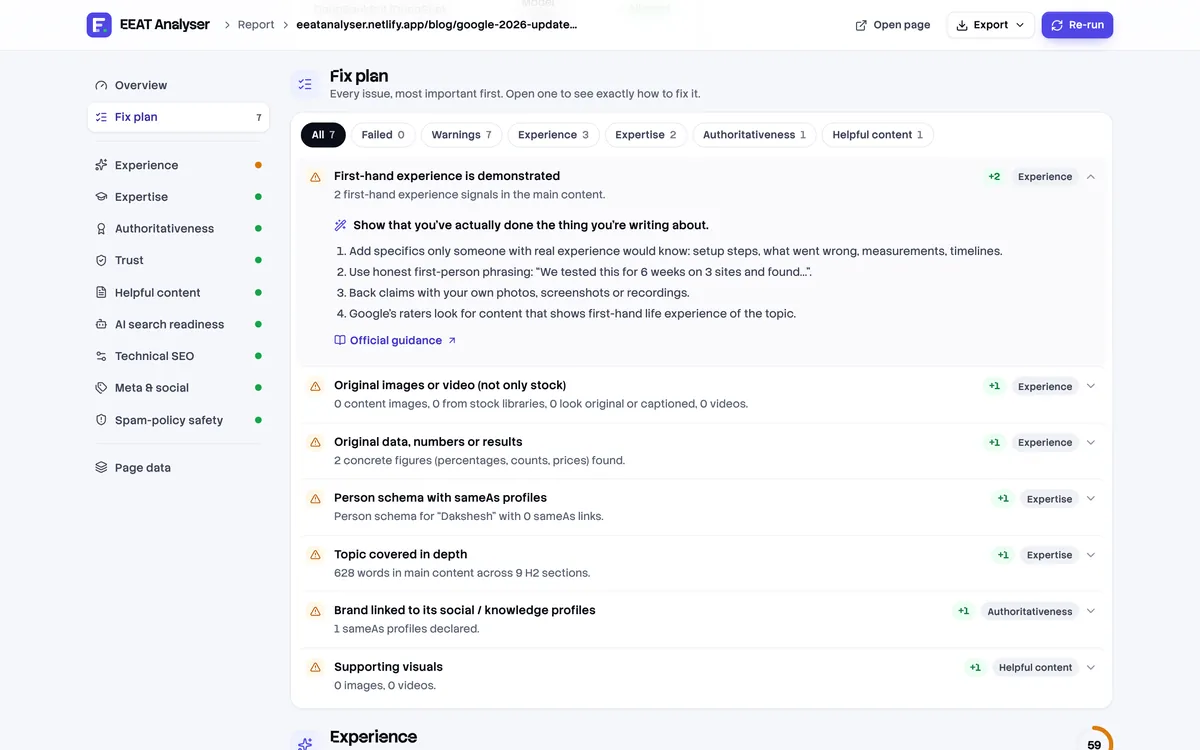
Fix plan with an expanded issue showing plain-English steps and a link to Google's official guidance
A real fix plan from auditing this website.
Permissions, explained

Exactly what the extension can access - and why.

Version 2.0 asks for no new permissions, so updating from 1.x is silent and automatic.

Read and change site data (host access)

Needed to download the page you ask it to audit, plus that site's robots.txt and llms.txt. It reads nothing until you click Audit, and it never changes pages.

activeTab & tabs

To know which page you're on when you open the popup, and to open reports and the dashboard in new tabs.

storage

To save your audit history on your own device.

notifications

To tell you when a bulk audit has finished.

See your E-E-A-T score in the next 30 seconds.

Install the free extension, open any page, and click Audit. No account, no credit card, nothing uploaded.

300+ users on ChromeRuns 100% in your browser